Module 08 · Construction Schedule Management
The schedule is the project.
Know it. Control it.
Full construction schedule management — WBS hierarchy, Gantt chart, critical path analysis, progress tracking, and AI delay prediction before critical path slips become project failures.
Core Features
Schedule intelligence from L1 to L4 WBS.
📅
WBS Hierarchy & Activities
- ✓Work Breakdown Structure: L1 Project → L2 Area → L3 System → L4 Activity
- ✓Activity CRUD with planned start, finish, duration, and dependencies
- ✓Predecessor/successor logic: Finish-to-Start / Start-to-Start / Finish-to-Finish
- ✓Resource assignment — discipline, team, and equipment per activity
- ✓Discipline code linkage to engineering deliverables and FOM work fronts
- ✓Industry schedule templates — Refinery / Petrochemical / Infrastructure
📊
Critical Path Method Engine
- ✓Full CPM calculation with forward and backward pass
- ✓Critical path identification — zero float activities highlighted
- ✓Float analysis — Total Float and Free Float per activity
- ✓Baseline schedule locking — planned vs actual comparison
- ✓Rebaseline management — formal approval workflow for baseline changes
- ✓CPM run history — every recalculation stored with timestamp
📈
Gantt Chart & Visualisation
- ✓Interactive Gantt with zoom — day / week / month / quarter views
- ✓Critical path highlighted in red on Gantt
- ✓Progress bars — planned vs actual per activity
- ✓Dependency lines — visual link between predecessor and successor
- ✓Colour-coded by status: On Track / At Risk / Delayed / Complete
- ✓Export Gantt to PDF for client reporting
📋
Progress & Productivity Tracking
- ✓% complete entry by activity — linked to FOM daily logs
- ✓Quantity-based progress: m³ concrete / tonnes steel / metres pipe
- ✓Earned value by activity — schedule performance tracking
- ✓Productivity rate — planned vs actual output per day/week
- ✓S-curve — planned vs actual vs forecast completion
- ✓Weekly progress entry and approval workflow
🗓️
Calendars & Resource Management
- ✓Project-specific calendars — working days, public holidays, shut periods
- ✓Resource histogram — planned vs actual manpower by week
- ✓Resource overload detection — more activities than available resource
- ✓Equipment calendar — crane, plant, and specialist equipment scheduling
- ✓Multi-shift scheduling — day shift / night shift / 24-hour
- ✓Subcontractor schedule integration — package sub-schedules linked
🔗
Cross-Module Integration
- ✓EPM — deliverable IFC status feeds into activity readiness
- ✓FOM — daily site progress updates activity % complete
- ✓PPM — material delivery dates integrated as activity constraints
- ✓QMS — hold points block activity progress until cleared
- ✓HSE — PTW requirements linked to activity start conditions
- ✓Interface — inter-contractor interface status integrated
AI in CPM — 5 AI Features
AI that sees schedule slippage before it reaches the critical path.
Predictive schedule intelligence — not just historical reporting.
🔮
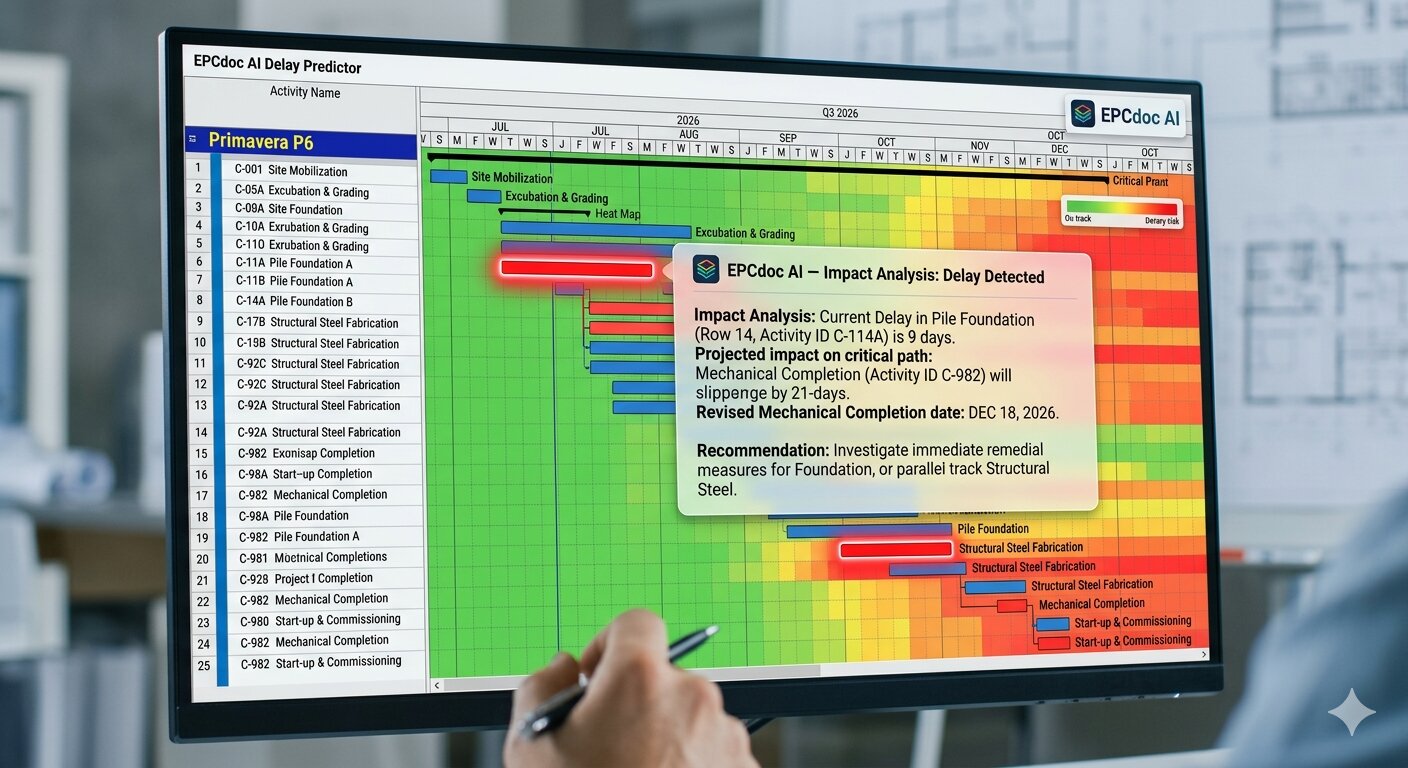
AI Schedule Delay Predictor
Analyses current activity productivity rates, resource availability, and weather patterns to predict which activities will slip — flags critical path impact weeks before it appears in the Gantt.
⚡
AI What-If Scenario Analyser
Model schedule recovery scenarios instantly — 'What if we add 2 excavators to Pile Foundation? What if we start Structural Steel in parallel?' AI recalculates completion date for each scenario.
🎯
AI Critical Path Impact Analysis
When any activity shows a delay, AI immediately calculates the cascade effect on all successors and project completion date — with recommended acceleration options and cost implications.
👥
AI Resource Overload Detector
AI identifies weeks where planned activities require more resource than available — flags the conflict 3–4 weeks ahead so planners can level the schedule or pre-mobilise resources.
📊
AI Weekly Progress Report
AI generates the complete construction schedule chapter of the WPR — activities completed, activities delayed, float consumed on critical path, and recommended recovery actions.
How It Works
From project setup to live critical path in one day.
1
Build WBS
Create L1–L4 hierarchy. Import from CSV or use industry templates. Link disciplines and areas.
2
Load Activities
Enter or import activities with durations and dependencies. Assign resources and calendars.
3
Run CPM
System calculates critical path. Baseline locked. Progress tracking begins against plan.
4
AI Monitors
AI flags delays before they hit critical path. Weekly AI reports keep every stakeholder informed.
Start using Construction Schedule today
Included in every plan. Live in 15 minutes. No consultant needed.
14-day free trial · All 21+ modules · No credit card required
💬 Ask me about EPCdoc