Module 02 · Document Management System
Every document. Every revision.
Under complete control.
Enterprise document control built for EPC — intelligent DDM, multi-cycle review workflows, AI title block extraction, and a full audit trail from DRAFT to AS-BUILT.
Core Features
DMS built for engineering document complexity.
📂
Master Document Register (MDR)
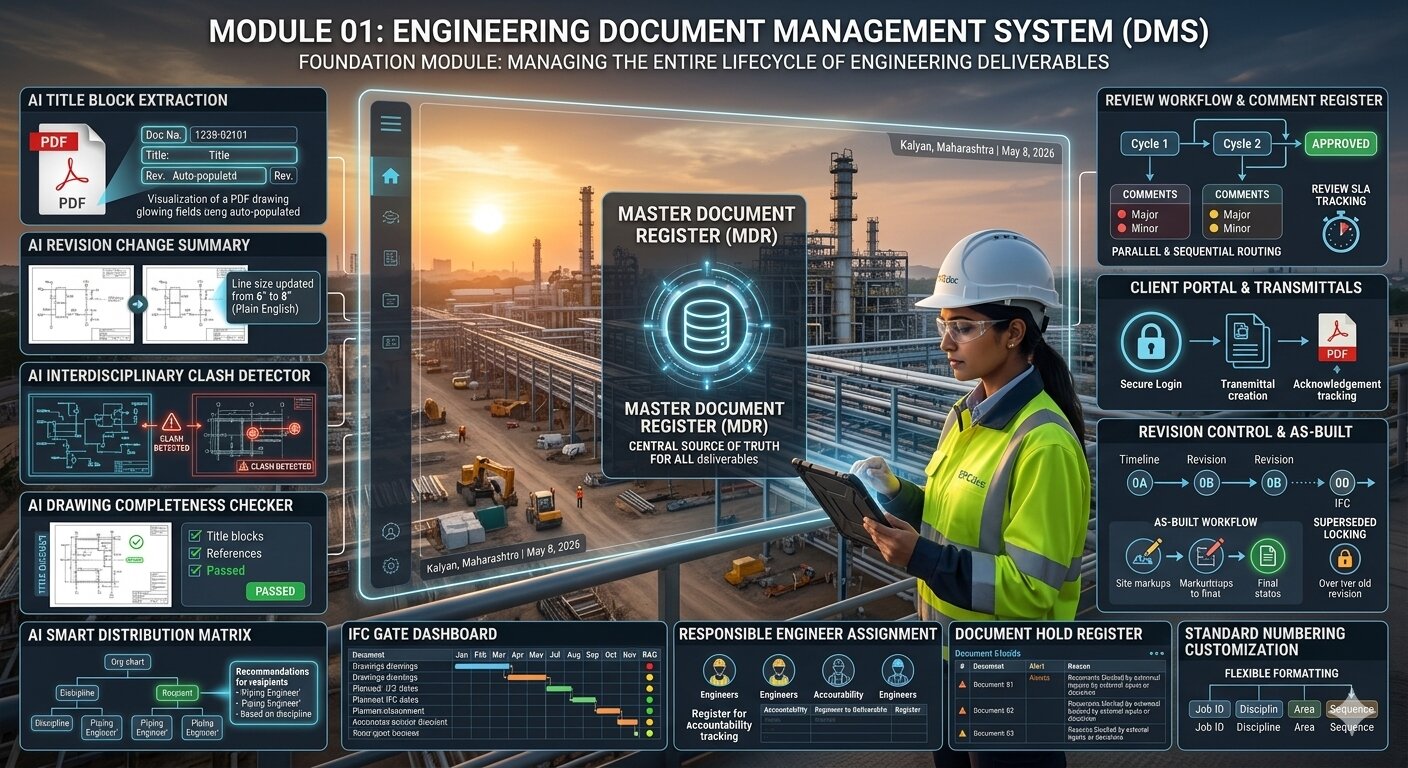
- ✓MDR with RNEI-compliant auto-numbering — configurable per project
- ✓Document types, disciplines, area codes fully configurable
- ✓Full version history with supersede audit trail
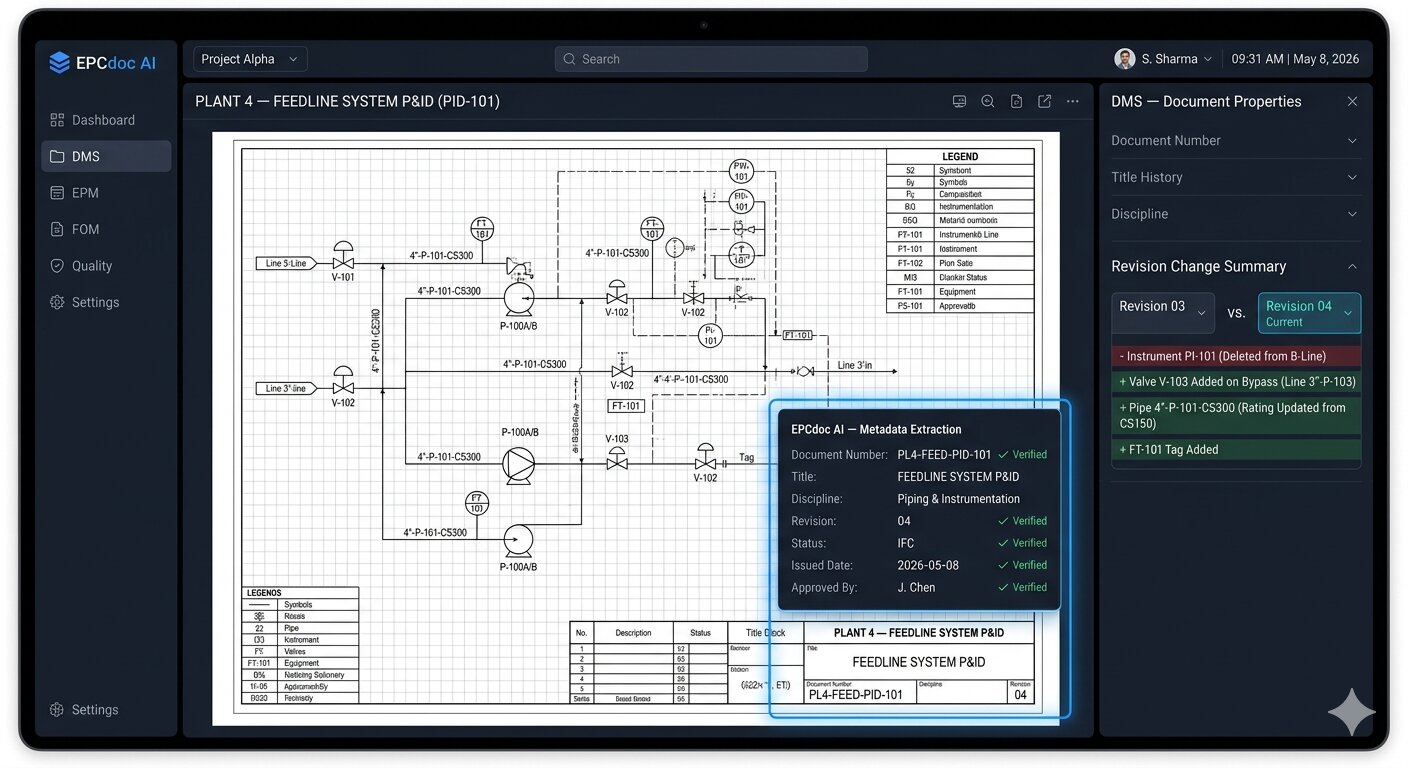
- ✓Bulk upload with AI title block extraction from PDF drawings
- ✓Issue status lifecycle: DRAFT → IDC → IFR → IFA → IFC → AFC → ASB
- ✓Responsible engineer, revision description, and reason for issue tracked
📨
Transmittals & DDM Engine
- ✓Automatic transmittals generated on document issue status change
- ✓DDM rules configurable by discipline, document type, and issue status
- ✓Manual transmittal creation with AI-drafted cover letter
- ✓Transmittal PDF with full cover sheet — client-ready
- ✓Acknowledgement tracking — who received, which revision, when
- ✓Overdue transmittal reminders sent automatically by scheduler
🔄
Multi-Cycle Review Workflows
- ✓Parallel and sequential review routing per document type
- ✓Multi-cycle tracking: Cycle 1, 2, 3 with full reviewer history
- ✓Comment register — C-001/C-002 auto-numbering with Major/Minor/Info severity
- ✓Review SLA tracking — overdue review badges on live dashboard
- ✓Review matrix — all reviewers and cycle status in one view
- ✓Workflow templates for standard document type routing
👥
Client & External Portals
- ✓Client review portal — secure token-based access, no account required
- ✓Client documents module — separate register for owner-issued documents
- ✓External submission portal for contractor document packages
- ✓Company standards library — reference documents for all project teams
- ✓Share links — controlled external access with configurable expiry
- ✓BCF issue tracking linked to BIM models and CAD integrations
🔢
Document Numbering & Configuration
- ✓RNEI-compliant auto-numbering configurable per tenant and project
- ✓Discipline codes, deliverable codes, area codes — all configurable
- ✓Per-project document number sequences with gap detection
- ✓DDM bulk import from Excel — load all distribution rules at once
- ✓Duplicate number detection and conflict alerts before issue
- ✓Document hold register — formal holds with reason and resolution
🔍
Search, Discovery & Viewer
- ✓Full-text search across MDR, titles, metadata, and revision notes
- ✓Semantic AI search — ask questions, get cited answers from documents
- ✓Filter by discipline, status, revision, responsible engineer, date
- ✓In-browser PDF viewer — streaming with auth (no download required)
- ✓Saved search filters for regular project queries
- ✓Document checkout system for controlled concurrent editing
AI in DMS — 8 AI Features
AI that processes drawings at scale.
DMS AI eliminates manual data entry across thousands of documents.
📐
AI Title Block Extraction
Upload any PDF drawing. AI reads the title block and auto-fills document number, revision, title, discipline, scale, drawn-by, and checked-by. Zero manual data entry across thousands of drawings.
📋
AI Document Classification
AI classifies every document by discipline and type from filename and content — consistent, instant, and accurate across the entire register.
📨
AI Transmittal Letter Drafting
AI writes a complete, professional transmittal cover letter from project data — project name, document list, issue purpose — ready to issue in 10 seconds.
🔄
AI Revision Change Summary
AI compares two revisions of a document and generates a plain-English summary of every change — saves review time on every revision cycle.
⚠️
AI Interdisciplinary Clash Detector
AI identifies contradictions between documents across disciplines — flags when a piping drawing references a structural element that has changed in a newer revision.
✅
AI Drawing Completeness Checker
AI verifies that every drawing has a complete title block, correct references, and meets project numbering format — before it enters the formal register.
🎯
AI Smart Distribution Matrix
AI suggests additional recipients for transmittals based on document discipline, phase, and historical distribution patterns from the organogram.
🔍
Semantic Document Search (RAG)
Ask 'Which P&IDs were issued IFC in Q3?' or 'Show all structural drawings under review for Package 3' and get instant, accurate results from your live MDR.
How It Works
From upload to issued transmittal in minutes.
1
Upload & Register
Upload drawings or documents. AI reads title blocks and pre-fills the MDR. Manual correction where needed.
2
Configure DDM Rules
Set distribution rules by discipline and document type. System auto-generates transmittals on issue.
3
Review & Approve
Reviewers receive email notifications. Comments tracked with severity. SLA clock runs automatically.
4
Issue & Track
Documents issued via transmittal. Acknowledgements tracked. AS-BUILT workflow closes the lifecycle.
Start using Document Management today
Included in every plan. Live in 15 minutes. No consultant needed.
14-day free trial · All 21+ modules · No credit card required
💬 Ask me about EPCdoc